 GitBucket
 Fanfarm User
authored
on 12 Sep
Fanfarm User
authored
on 12 Sep
|
|||
|---|---|---|---|
| .. | |||
| dist | 7 months ago | ||
| CHANGELOG.md | 7 months ago | ||
| LICENSE.md | 7 months ago | ||
| README.md | 7 months ago | ||
| package.json | 7 months ago | ||
PostCSS Logical Properties and Values 


[PostCSS Logical Properties and Values] lets you use logical, rather than
physical, direction and dimension mappings in CSS, following the
[CSS Logical Properties and Values] specification.
.banner {
  color: #222222;
  inset: logical 0 5px 10px;
  padding-inline: 20px 40px;
  resize: block;
  transition: color 200ms;
}

/* becomes */

.banner:dir(ltr) {
  padding-left: 20px;
  padding-right: 40px;
}
.banner:dir(rtl) {
  padding-right: 20px;
  padding-left: 40px;
}
.banner {
  color: #222222;
  top: 0;
  left: 5px;
  bottom: 10px;
  right: 5px;
  resize: vertical;
  transition: color 200ms;
}

/* or, when used with { dir: 'ltr' } */

.banner {
  color: #222222;
  top: 0;
  left: 5px;
  bottom: 10px;
  right: 5px;
  padding-left: 20px;
  padding-right: 40px;
  resize: vertical;
  transition: color 200ms;
}

/* or, when used with { preserve: true } */

.banner:dir(ltr) {
  padding-left: 20px;
  padding-right: 40px;
}
.banner:dir(rtl) {
  padding-right: 20px;
  padding-left: 40px;
}
.banner {
  color: #222222;
  top: 0;
  left: 5px;
  bottom: 10px;
  right: 5px;
  inset: logical 0 5px 10px;
  padding-inline: 20px 40px;
  resize: vertical;
  resize: block;
  transition: color 200ms;
}
These shorthand properties set values for physical properties by default.
Specifying the logical keyboard at the beginning of the property value will
transform the flow-relative values afterward into both physical LTR and RTL
properties:
Logical Borders
border,border-block,border-block-start,border-block-end,border-inline,border-inline-start,border-inline-end,border-start,border-end,border-color,border-block-color,border-block-start-color,border-block-end-color,border-inline-color,border-inline-start-color,border-inline-end-color,border-start-color,border-end-color,border-style,border-block-style,border-block-start-style,border-block-end-style,border-inline-style,border-inline-start-style,border-inline-end-style,border-start-style,border-end-style,border-width,border-block-width,border-block-start-width,border-block-end-width,border-inline-width,border-inline-start-width,border-inline-end-width,border-start-width,border-end-width,border-start-start-radius,border-start-end-radius,border-end-start-radius,border-end-end-radius
Logical Offsets
inset,inset-block,inset-block-start,inset-block-end,inset-inline,inset-inline-start,inset-inline-end,inset-start,inset-end
Logical Margins
margin,margin-block,margin-block-start,margin-block-end,margin-inline,margin-inline-start,margin-inline-end,margin-start,margin-end
Logical Paddings
padding,padding-block,padding-block-start,padding-block-end,padding-inline,padding-inline-start,padding-inline-end,padding-start,padding-end
Logical Sizes
block-size,max-block-size,min-block-size,inline-size,max-inline-size,min-inline-size
Flow-Relative Values
clear: inline-start,clear: inline-end,float: inline-start,float: inline-end,text-align: start,text-align: end
By default, [PostCSS Logical Properties and Values] creates fallback selectors
which require at least one [dir] attribute in your HTML. If you don’t have
any [dir] attributes, consider using the following JavaScript:
// force at least one dir attribute (this can run at any time)
document.documentElement.dir = document.documentElement.dir || 'ltr';
Otherwise, consider using the dir option to transform all logical properties
and values to a specific direction.
require('postcss-logical')({
  dir: 'ltr'
});
Usage
Add [PostCSS Logical Properties and Values] to your project:
npm install postcss-logical --save-dev
Use [PostCSS Logical Properties and Values] as a PostCSS plugin:
const postcss = require('postcss');
const postcssLogical = require('postcss-logical');

postcss([
  postcssLogical(/* pluginOptions */)
]).process(YOUR_CSS /*, processOptions */);
[PostCSS Logical Properties and Values] runs in all Node environments, with
special instructions for:
| Node | PostCSS CLI | Webpack | Create React App | Gulp | Grunt |
|---|---|---|---|---|---|
Options
dir
The dir option determines how directional fallbacks should be added to CSS.
By default, fallbacks replace the logical declaration with nested :dir
pseudo-classes. If dir is defined as ltr or rtl then only the left or
right directional fallbacks will replace the logical declarations. Ifpreserve is defined as true, then the dir option will be ignored.
preserve
The preserve option determines whether directional fallbacks should be added
before logical declarations without replacing them. By default, directional
fallbacks replace logical declaration. If preserve is defined as true, then
the dir option will be ignored.
:dir() pseudo class
This plugin transforms using the :dir(ltr) pseudo class.
Use postcss-dir-pseudo-class to further transform to [dir="ltr"].
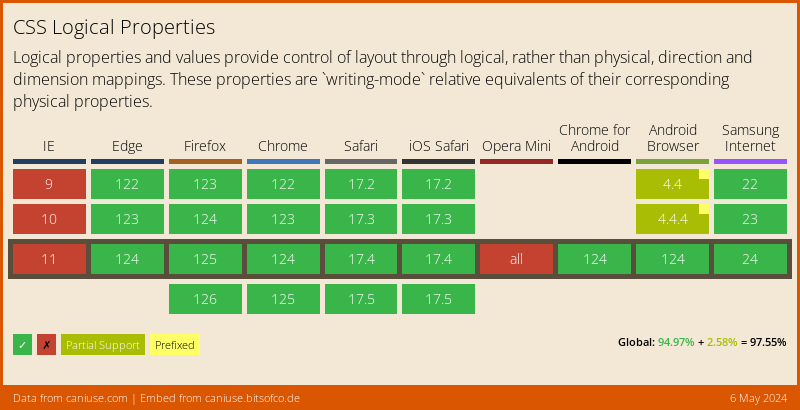
Currently :dir(ltr) doesn't have great browser support but this will improve over time.